
Chartered Accountancy firms handle large volumes of client documents every day — GST returns, income-tax filings, audit working papers, notices, agreements, and compliance records. When those files sit across email inboxes, desktops, shared drives, and messaging apps, teams spend more time searching than practising. A clear document management software for CA firms approach brings structure, control, and faster access to the same documents your firm already depends on.
This article explains why document management matters for CA practices in India, how CA Cloud Desk Document Management (Document Vault) helps organise, secure, and retrieve client files, and how it fits into day-to-day practice work — using only capabilities already described on the CA Cloud Desk product pages.
Why Document Management Is Important for CA Firms
Document chaos is rarely a technology problem alone. It grows with every client engagement. Common issues include:
- Documents spread across locations — files on individual systems, WhatsApp chats, email attachments, and local folders make it hard to know which version is current.
- Difficulty finding files — during reviews, assessments, or audit follow-ups, staff lose time hunting for the right return, notice, or working paper.
- Repeated document requests — when a file cannot be found quickly, clients are asked again for papers they already shared.
- Managing client documents at scale — multi-partner firms need a consistent place for each client’s papers, not ad-hoc folder habits.
- Controlled access — sensitive tax and financial records should stay with authorised users, not open shared folders.
- Organising efficiently — without folders, naming discipline, and search, retrieval slows as the practice grows.
For GST, ITR, audit, and other compliance work, delayed document access can delay filings and reviews. That is why many practices look for CA document management software that sits inside their practice workflow rather than as a disconnected drive.
How CA Cloud Desk Simplifies Document Management
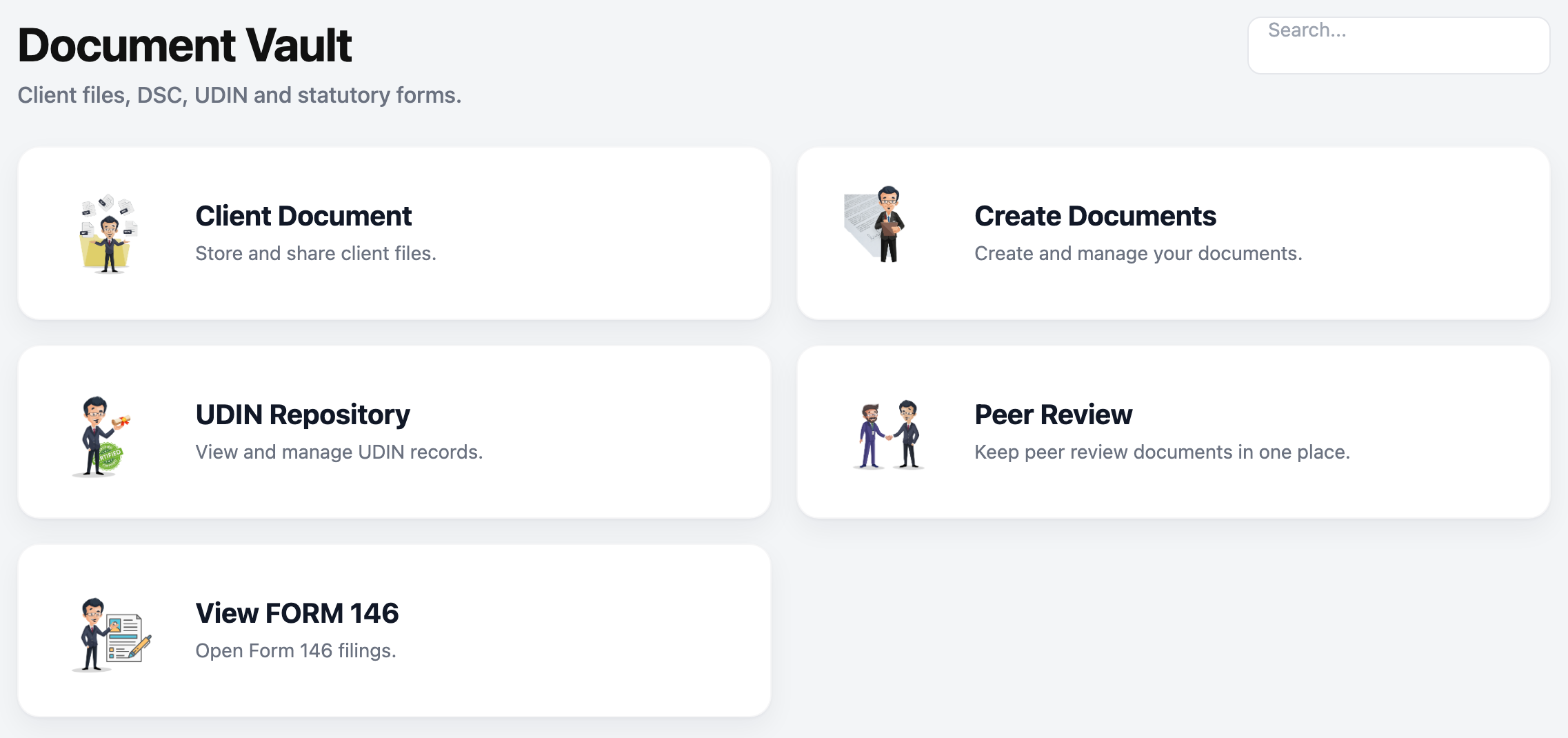
CA Cloud Desk provides a centralized Document Vault so client documents can be stored, organised, searched, and shared from one place. The product positioning on the Document Management page is straightforward: one secure place for every client document, with access control so sensitive files stay with authorised users.
Instead of treating documents as loose attachments, the vault keeps files in a practice-oriented structure — linked to how your team already works with clients and orders or tasks. That reduces scattered storage and helps firms move from “where is this file?” to “open the client vault and search.”
Key Document Management Features in CA Cloud Desk
The following capabilities are described on the CA Cloud Desk Document Management / Document Vault pages:
Centralized document storage
Store files in a centralized system so teams are not dependent on scattered locations. A single vault reduces duplicate copies and makes it clearer where the practice’s records live.
Folders and organisation
A logical folder structure supports navigation and retrieval. Firms can organise documents in a way that matches how they serve clients — rather than relying on personal desktop folders.
Document search
Robust search helps tax professionals find documents faster when deadlines are tight and reviewers need the right file without delay.
Document naming
Documents can be renamed dynamically with clearer titles or labels, which improves findability when multiple people work on the same client.
Secure storage and access control
CA Cloud Desk describes secure storage in AWS data centres and access control that grants specific permissions so sensitive files remain with authorised individuals.
Document sharing
Documents can be shared with customers so work keeps moving — for example when a client needs a file for confirmation or follow-up — without reverting to unmanaged email chains as the only option.
Add and upload documents
Documents can be added to the vault, including while creating an order or task. That helps teams capture papers at the moment work starts, instead of storing them separately and reconnecting later.
Client documents in one place
Keeping each client’s files together supports cleaner handovers between team members and reduces the risk of mixing papers across engagements.
Local storage record
The module also describes maintaining a local storage record useful for analysis or audit, with client files available from a single location context.
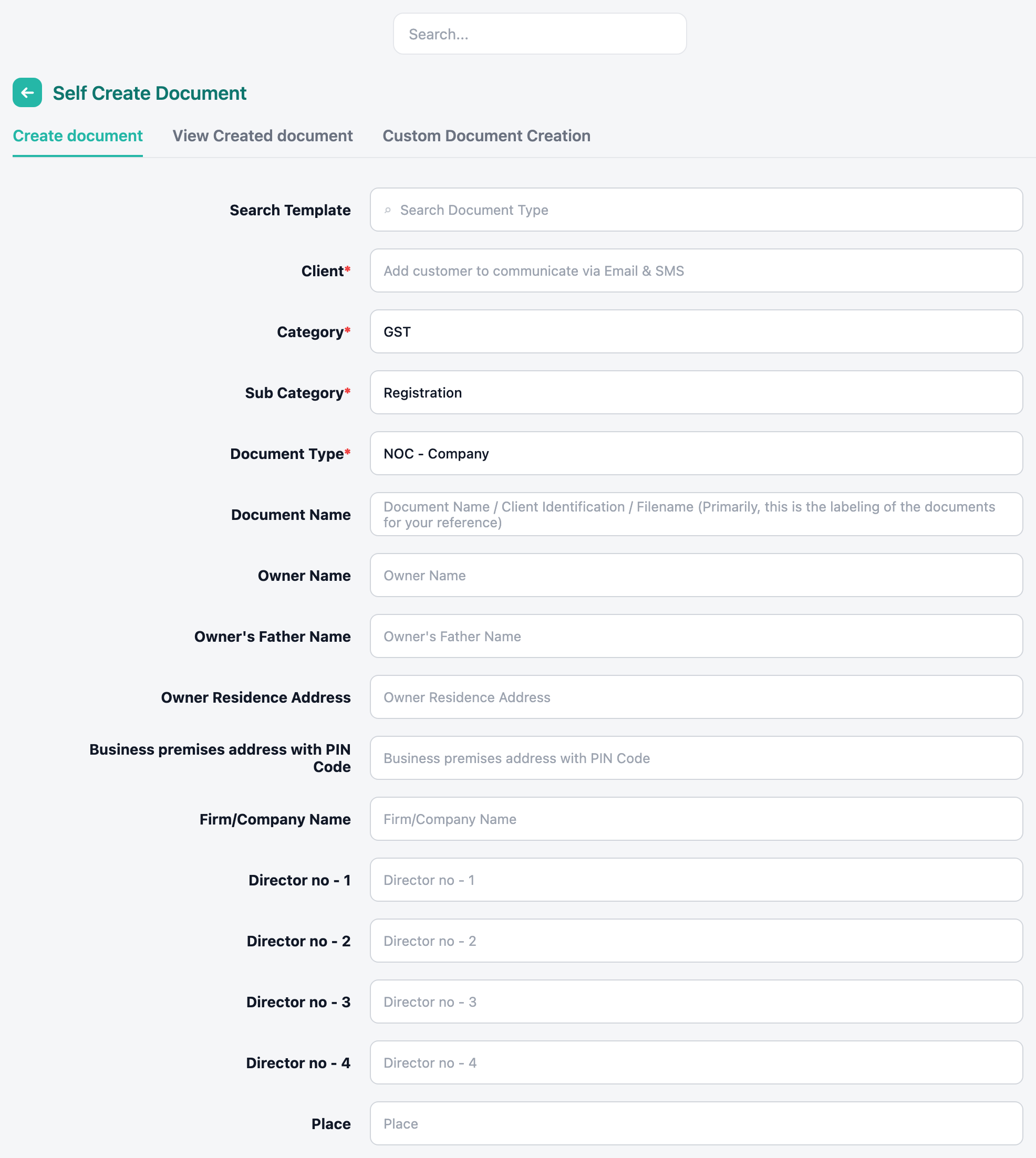
Self Create Document (related)
Where practices prepare standard papers, Self Create Document supports templates such as agreements, NOC, and contracts, with generated documents stored in the vault and available for secure sharing. Categories and sub-categories, along with UDIN and forms-related record keeping, are part of that documented flow.
How Document Management Works
A practical workflow for CA firms using the Document Vault looks like this:
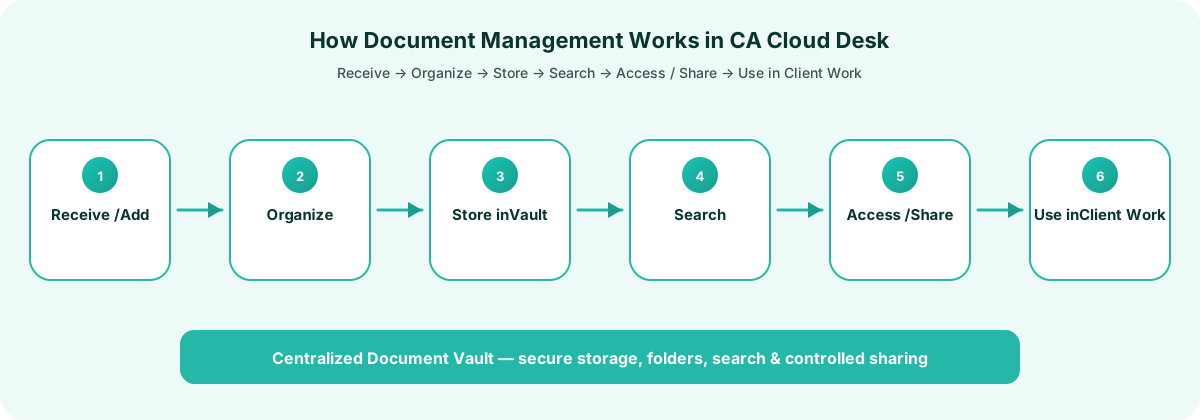
- Receive / Add Document — Capture client papers when they arrive, including while creating an order or task.
- Organize — Place files in a logical folder structure and apply clear naming.
- Store — Keep documents in the centralized Document Vault rather than on personal devices alone.
- Search — Use search when reviewers, partners, or staff need a specific file quickly.
- Access / Share — Open files with authorised access, and share with customers when the engagement requires it.
- Use in client work — Reuse vault files while creating orders so the same document is not uploaded repeatedly.
This sequence mirrors the Document Management page guidance: received documents move through select-client, upload/store, organise, search/access, and share/use stages.
Benefits for CA Firms
When documents sit in a structured vault, firms typically see practical day-to-day gains:
- Faster document retrieval — search and folders reduce time spent locating returns, notices, and working papers.
- Better organisation — client-wise storage replaces scattered personal folders.
- Less manual searching — teams spend more time on review and filing, less time on file hunts.
- Easier collaboration — authorised users can work from the same document source.
- Controlled access — permissions help protect sensitive client information.
- Connected client information — documents stay aligned with the client context rather than floating in email.
- Improved practice workflow — adding documents during order/task creation reduces process gaps.
These benefits matter most during peak seasons — GST return cycles, ITR deadlines, and audit windows — when document volume and time pressure rise together.
Document Management and Other CA Cloud Desk Modules
Document Management is designed to sit alongside the rest of CA Cloud Desk practice operations. Connections that are clearly evidenced include:
- Client Management — Keep each client’s documents together so the vault aligns with client records rather than anonymous file dumps.
- Task Management — Documents can be added while creating an order or task, and vault files can be used while creating orders to avoid duplicate storage.
Together, client context, tasks/orders, and the Document Vault help firms keep papers attached to real work — not as a separate “drive” that staff forget to update.
Who Can Use It?
Document management for CA firms in CA Cloud Desk is relevant for:
- CA firms of different sizes that handle multi-client document volumes
- Chartered Accountants managing GST, tax, audit, and compliance engagements
- Tax professionals who need faster search and organised client files
- Accounting teams that collaborate on the same client papers
- Compliance teams that need controlled access to sensitive records
Frequently Asked Questions
1. What is Document Management in CA Cloud Desk?
It is the Document Vault capability used to securely store, organise, search, and share client documents in a centralized place, with access control for authorised users.
2. Can we organise documents in folders?
Yes. CA Cloud Desk describes a logical folder structure to support navigation and retrieval of client documents.
3. How do we find documents quickly?
The Document Management module includes robust search so tax professionals can locate files faster than browsing scattered folders.
4. Can documents be shared with clients?
Yes. Document sharing with customers is part of the documented feature set, helping keep engagements moving without relying only on unmanaged channels.
5. Is access to sensitive files controlled?
Access control is described so specific permissions can be granted and sensitive files remain with authorised individuals. Secure storage in AWS data centres is also described on the product page.
6. Can we add documents while creating work?
Yes. Documents can be added even while creating an order or task, which helps capture papers at the point of work.
7. How does this relate to Self Create Document?
Self Create Document helps generate documents from templates (such as agreements, NOC, and contracts). Finished documents can be stored in the vault and shared securely as described on the Self Create / Document Management pages.
Conclusion
Effective client document management for CA firms is less about collecting more files and more about knowing where each file belongs, who can access it, and how quickly the team can retrieve it during compliance work. CA Cloud Desk Document Management brings those needs into a centralized Document Vault — with folders, search, sharing, access control, and the ability to add documents as work is created.
If your practice is ready to reduce scattered storage and tighten document handling, explore CA Cloud Desk Document Management or book a live demo to see the Document Vault in your firm’s workflow.

